Every company. Every location.
One yardstick.
Put each acquisition on ONEREQ PRO and run it on the same numbers as the rest of the group: one definition of revenue, margin and collections, a portfolio view across your companies, and the reports each GM runs on. Built by an operator who has owned and run multiple HVAC companies.
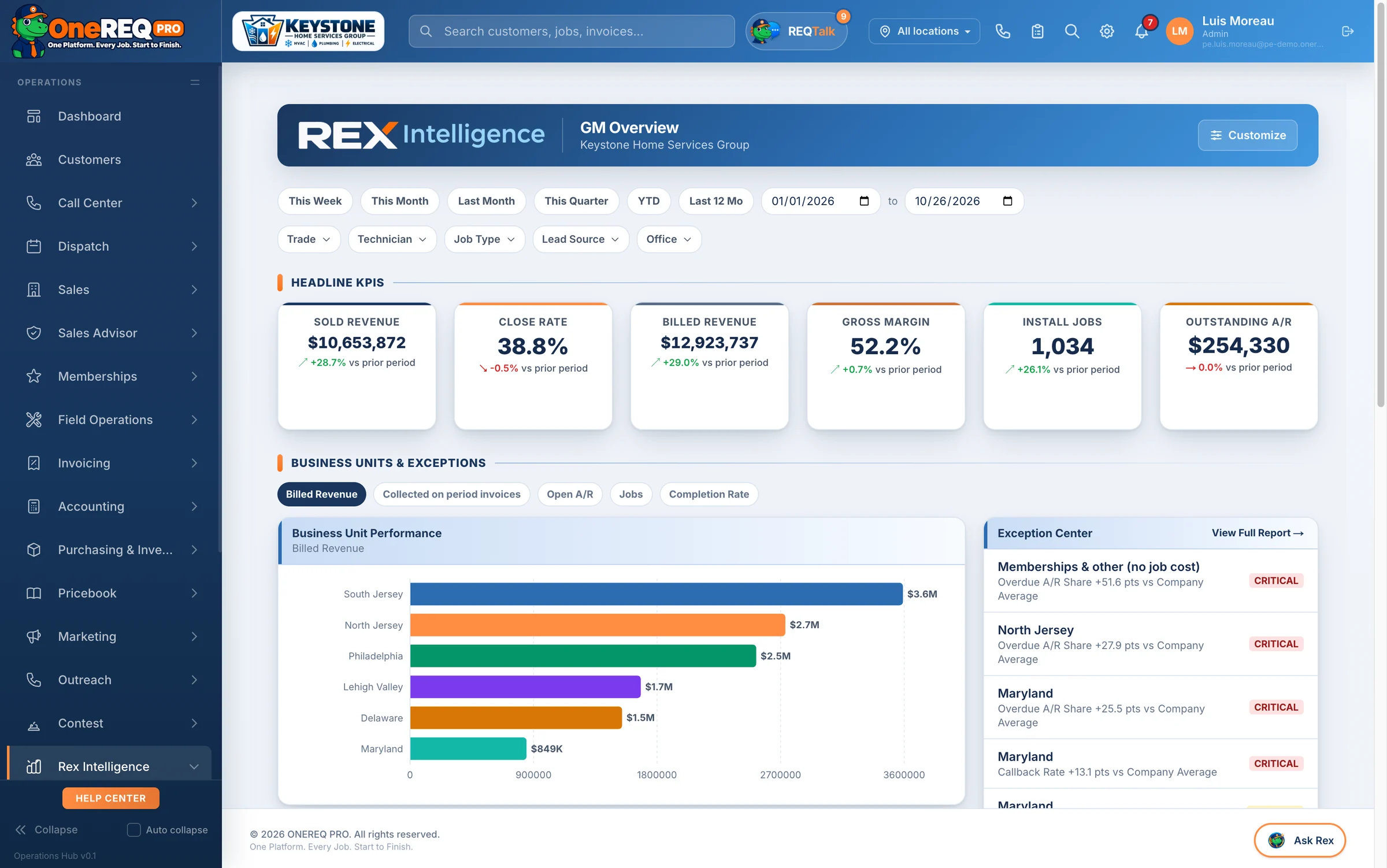
See the group. Run each company on its own books.
Several companies under one owner, set up as one organization. Nothing is merged: each company keeps its books, payments and brand, and you see them side by side.
- A portfolio view across companiesCash collected, billed, collection rate, A/R and overdue, lender, rebate and warranty money owed, jobs completed and active memberships, for each company and in total.
- One sign-in, every companyOwners and admins switch between companies without logging out. Give your team the access they need: owner, admin, or reports only.
- One definition for every numberCollected, billed, A/R, overdue and gross margin are computed the same way in every company and every report, so a 40% margin means the same thing everywhere.
- Each company keeps its own booksIts own Stripe, its own QuickBooks with a daily sync, its own price book and branding. Clean for a carve-out or a sale.
- Proven price books, copiedStart a new acquisition from a price book that already works. Preview the copy first; after that it’s theirs to tune.
- Security your lenders ask aboutCustomer phone numbers and addresses encrypted at rest, every company’s data walled off from the others, two-factor sign-in and role-based access.
Many locations, run as one company.
On the Enterprise plan (from $1,899 a month: 30 technicians, 20 office users and 3 locations included, more on request), every job, invoice, payment and call carries its location.
- Locations with their own identityEach location’s name, license, logo, phone and time zone on its estimates, invoices and emails.
- Territories that route the workZip-code territories send every lead, call and booking to the right location.
- Access by locationA manager sees all locations or only their own, everywhere in the platform.
- Dispatch across locationsDispatch from headquarters, by location, or both; set the rules for lending techs, and see how much each location can still take each day.
- Budgets by locationSet a budget for each location and see budget vs actual every month.
- An exception center for the GMFlags the location falling behind its budget pace, so the conversation happens this week, not at quarter end.
The reports every GM actually runs on.
For each company and each location, with every number defined once. No location builds its own spreadsheet.
- Executive scorecardHeadline numbers against target and the prior period, with budget pace.
- GM scorecard by locationEvery location side by side on the same yardstick.
- Net profit by tradeWhat’s left after materials, labor, commissions and dealer fees, by trade.
- A/R aging and collectionsWhat’s owed, how old it is and who owes it, with reminders that chase it.
- Technician scorecardsRevenue, callbacks and closing % by tech, counted by jobs run.
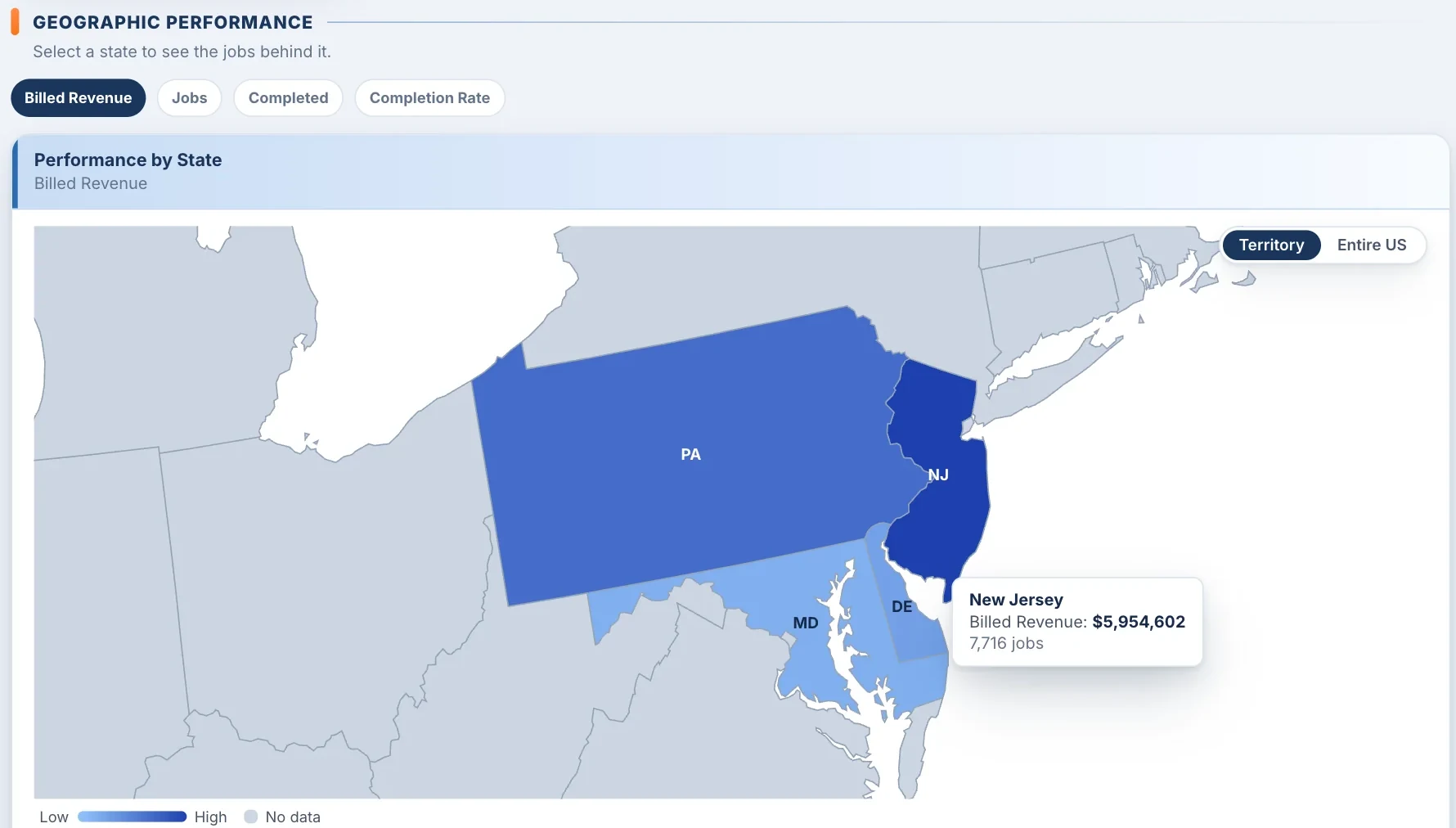
- Performance by stateFor groups that cross state lines.
See where the money is made, state by state.
The executive overview maps the company across every state it works in. Switch between billed revenue, jobs, completed jobs and completion rate, hover a state for its numbers, and select it to see the jobs behind it. View your own territory or the entire US.
Closed on Friday. On the platform in two weeks.
- Bring the ServiceTitan exportCustomers, jobs, equipment and memberships import from it; other systems come over by spreadsheet.
- Customers land in the right locationImported customers are routed to their location by territory.
- Price book in, price book outImport a price book, or copy one from another company in the group.
- Live in 14 daysWhite-glove migration, trade setup, QuickBooks and phones, and live training for the office and the techs.
- Apps on day oneONEREQ PRO Field for the techs and HomeRex for the customers come with every plan.
On the roadmap: scope it with us
We would rather tell you what’s coming than sell it to you as finished. Today the group sees the portfolio view, and the full Rex reports run inside each company. Next:
- Rex reports consolidated across companies
- Group-level budget and KPI templates pushed to every company
- Single sign-on (SSO) for your team
- One invoice for the whole group
If one of these decides your deal, tell us on the demo and we’ll scope it with you.
Walk a six-location group, live.
Our demo company runs six locations across four states in HVAC, plumbing and electrical. We’ll show you the GM exception center, budget vs actual by location and the portfolio numbers on a live call.