Make the whole shop
a team sport.
Put your techs, sales and office on teams. Points score themselves off real work — completed jobs, signed estimates, memberships sold, five-star reviews — and the standings post every day in Team Hub and on every tech’s phone. No spreadsheets. No arguments about the tally.
 8,032points · 4–2 in weekly wins
 7,090points · 2–4 in weekly wins
Pay for the behaviour you want, and watch it show up.
A contest is the cheapest sales training you will ever buy — when the scoring is fair, automatic and in front of everyone.
More sold on every call
You choose what earns points and how many, per trade: memberships, system replacements, add-ons, IAQ. Techs start offering the things that score.
Fewer callbacks
A clean week earns a bonus and a callback costs it, so quality counts as much as volume. Nobody wins by rushing jobs.
More five-star reviews
A review that names the tech scores points, so techs ask for them on the way out — and the customer hears the tech’s name twice.
A closing % you can prove
Each contest records the team’s closing % before it starts and pays a weekly bonus on the improvement, so you see whether it worked.
Everyone plays
Dispatchers and CSRs score on their own weekly production. Installers stay out of the closing tiers because they don’t sell. Big branches can’t win on headcount — standings are per person.
Recognition in front of everyone
Every points award and the daily leaderboard post in the contest’s Team Hub channel. The win is public, the same day.
Set it up once. It runs itself.
Pick the teams
Draft teams or assign them, by branch, trade or crew. Give each team a name and a colour.
Write the rules
Points per action, per trade, plus weekly bonuses. The rules page is printable and everyone can read it.
Let the work score
Points post off completed jobs, signed estimates and reviews as they happen. The office can add points by hand too.
Post the standings
Team, location and individual boards in the platform, a daily leaderboard in Team Hub, and a trophy tab in the field app.
Every screen of a live contest.
Points post themselves off completed jobs, signed estimates and reviews — no spreadsheet, no end-of-week tally. The rules are written down where everyone can read them, and every point shows up in Team Hub the moment it is earned.


Real screens from the demo account — the Fall Comfort Challenge, week 6 of eight, two teams across six branches.
It measures itself
Each contest records the team’s closing % before it started, then pays a weekly bonus on the improvement against that baseline. So you find out whether the contest moved anything, instead of assuming it did.
Nobody is left out
Dispatchers and CSRs score on their own weekly production rather than on sold jobs, with the metrics set per company. Installers are kept out of the closing tiers, because they do not sell.
It runs on its own
Points post off the job. Weekly bonuses compute on a schedule. Closing % is recalculated nightly as late invoices land, so a number cannot be stale on a Monday.
In their pocket
A trophy tab appears in the field app while a contest is live and disappears when it ends. Techs see the standings on the same phone they run the job on.
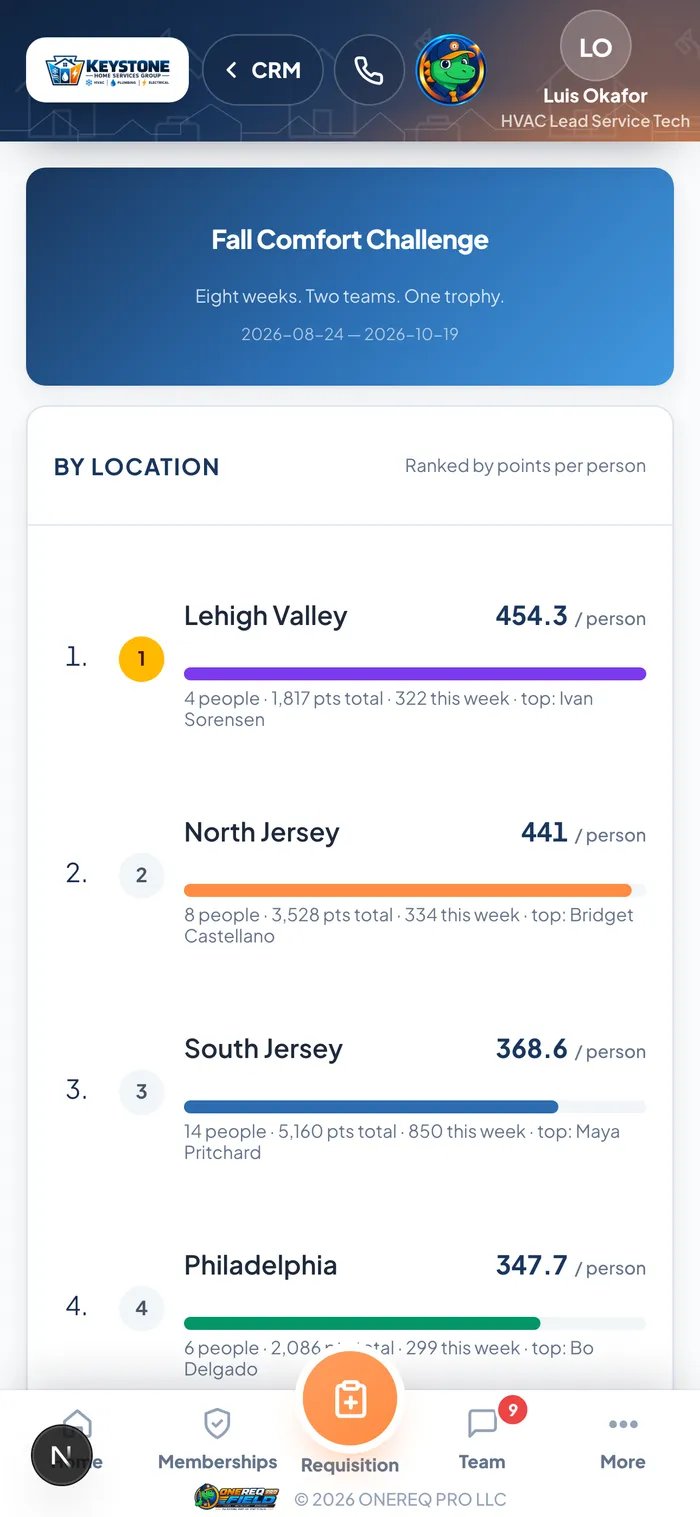
The tech’s view
The same standings the office sees, on the phone in their pocket, while the contest is running. No separate app to install, no login to remember, and nothing to update by hand.
People play harder for a team they want to be on.
Name the teams, give each one a colour, and put your contest logo on the board. The rivalry does the rest — the trash talk in the contest channel is half the fun.
- Team names and colours, set when you build the contest
- Your contest logo on the contest page and the dashboard
- Season and week-by-week views, with each team’s weekly wins
Start your first contest this month.
Contests are built into ONEREQ PRO — no extra app, no extra subscription. Book a demo and we’ll walk you through a live season on our demo company.