Stop losing the sale
at the kitchen table.
A 17-step guided in-home HVAC sales wizard with a built-in sizing helper, energy savings ROI, IAQ packages, tier-based pricing, auto commission queue, and one-click sold — built into the platform your dispatch already runs on. Part of the unified Sales Advisor suite alongside Electrical and Plumbing.
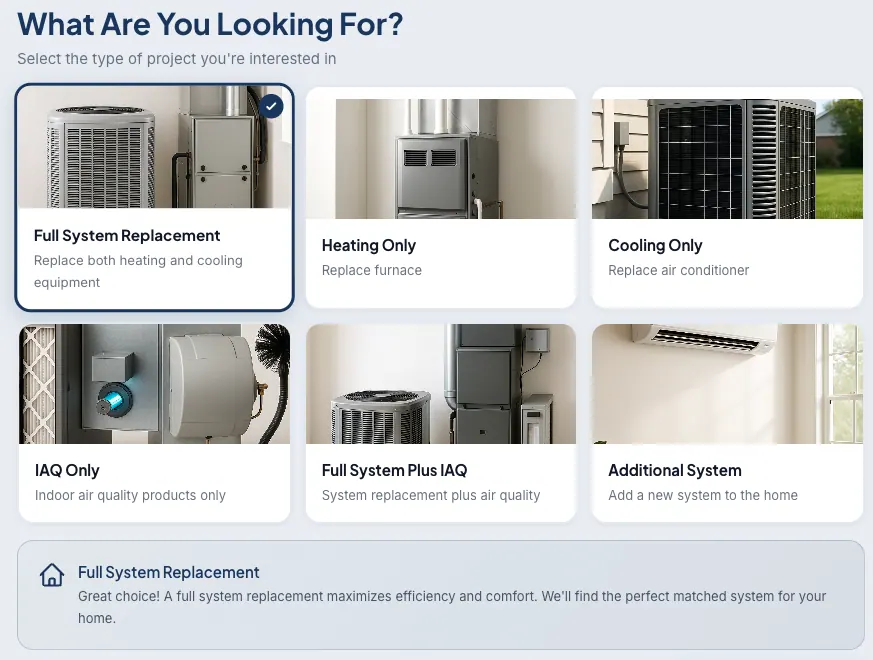
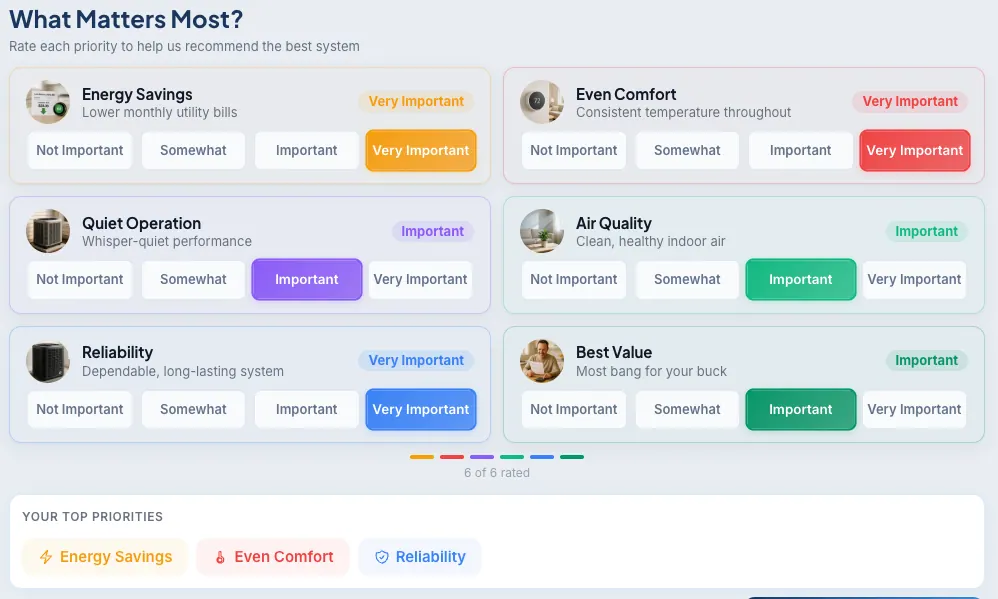
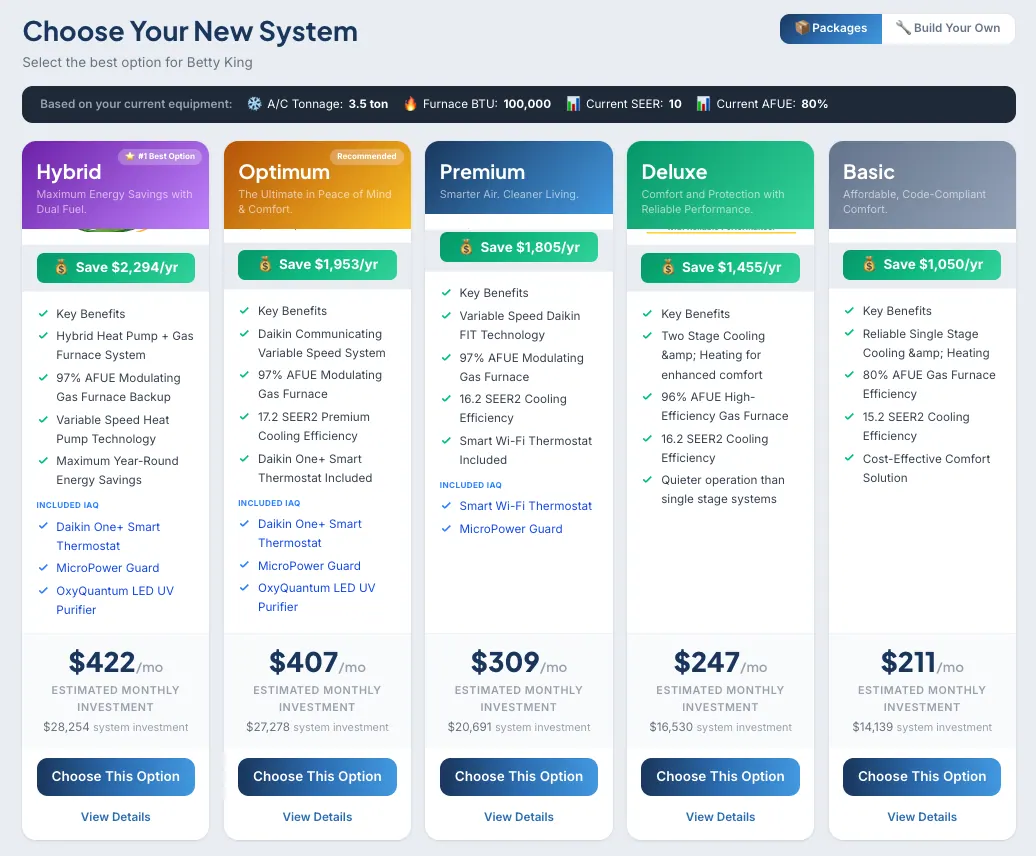


Make the options make sense.
Rex walks through a Comfort Advisor presentation: what matters to the homeowner, then Good, Better and Best on the tablet.
Subtitled.
Everything an in-home HVAC salesperson needs.
Seventeen guided steps. Built-in Manual J worksheet (included), or import from Amply, Cool Calc, Wrightsoft or Elite RHVAC. Auto commission queue. The moment the customer signs, it creates the install job, the requisition and the rebate applications; on Professional and Enterprise it creates the permit too.
17-Step Guided Wizard
Discovery, walk-through, photos, equipment age, comfort issues, sizing, IAQ, options, financing, rebates, review, sign. The advisor never wonders what's next.
Sizing — Done Your Way
Pick your tool: run the room-by-room Manual J worksheet built into the advisor, import the Amply or Cool Calc PDF you already have, or use ONEREQ PRO's sizing helper when the job doesn't need a full Manual J. Either way, the loads flow into the wizard and the pricing engine.
Energy Savings ROI
Compare current SEER to proposed SEER and show the customer a real annual savings number — and a true daily cost after savings on the investment card.
IAQ Package Builder
UV lights, media filters, humidifiers, dehumidifiers, surge protectors. Drop them into the package with photos and the customer sees the full system — not a line item they have to imagine.
Tier-Based System Selection
Options presented from best to basic, with live pricing pulled from your price book. You build your own systems and name your own packages, so the homeowner sees your real options, not three guesses.
Auto Commission Queue
The moment the customer signs, the commission engine writes the entry into the office’s Pending Commissions review queue — tied to the financing plan, discount, and signed total. The advisor sees a live preview of their commission before the customer signs. It shows up right away as a pending commission in the advisor’s My Earnings tab in ONEREQ PRO Field.
Interactive Homeowner Presentation
Built to be worked through, not watched. You or the homeowner can pick Good, Better or Best, choose a financing plan and see the monthly payment, apply for financing, add a membership and sign, right on the iPad as you go. Or they review and sign later from the proposal link you send.
Digital Signature Capture
Sign in person on the iPad, or send an email signing link to the customer's spouse. Both flows show your real terms, warranties, and payment authorization. In states that require a Home Improvement Contract, the customer signs your company’s own contract right after the proposal, and the signed PDF is saved to the customer’s files.
One-Click Sold
Customer signs → install job created → requisitions drafted → rebate applications created → permit created (Professional and Enterprise) → invoice + financing terms generated from the signed snapshot → commission queued for office review. All in one transaction.
Tech-Originated Leads
Service tech on a no-cool call taps Start CA Lead — pre-fills from the job, stamps the source tech, and writes a referral commission when the install closes.
Sales Manager Analytics
Advisor leaderboards, closing % counted by jobs run, average ticket, financing mix, pending vs paid commissions. Click any advisor to see their pipeline.
Real Customer Payment Math
Customer monthly payment uses the selected financing plan's real APR and term — not a hardcoded 12.99% over 120 months. What you quote is what they pay.
Prices Lock When the Customer Sees Them
The first time you tap Present in the home or email the proposal, its prices lock. A price-book change the next morning doesn’t move them. Updating to today’s prices is a deliberate step on an unsigned proposal that shows old against new first, and a signed proposal never changes price.
Your Own Videos in the Presentation
Add links to your company’s own videos (YouTube, Vimeo or an .mp4 link) and each one plays in the matching section of the homeowner presentation, only when someone taps play.
The math — work it in your own numbers
Count what one extra replacement a month is worth to your shop, then talk to us about a plan. The All-Trade Sales Suite puts the same guided flow in front of your plumbing and electrical calls too.

Real images. Every step.
CA-parity feature surface: real images on every step, financing flow, safety quiz, customer contacts, and a sign-in-person proposal page that looks like the brochure the manufacturer wishes it shipped.

HVAC-specific catalog. Built by HVAC contractors.
The Comfort Advisor is intentionally HVAC-only — you set up your own systems from your preferred supplier and equipment brands, and give your packages your own names and pictures in Advisor Setup. Electrical and Plumbing get their own catalogs with their own templates — same UX, trade-specific catalog.
See all trades →The load calculation becomes part of the sale.
A right-sized system is the easiest thing in the world to sell — if the homeowner watches you measure it. Run the ACCA Manual J right in the Comfort Advisor with our built-in worksheet — it comes with the Sales Advisor add-on. Already use load-calc software like Amply, Cool Calc, Wrightsoft or Elite RHVAC? Keep it. ONEREQ PRO reads its report, so either way the loads go straight into the proposal.
 Shown: Amply, a separate app — not included
Show them why it matters
The Comfort Advisor’s load-calculation step is a customer-facing page, not a form. Video, room-by-room precision, LiDAR, ACCA certification — and what an oversized or undersized system actually costs them.
Run the load calc your way
Fill in our built-in Manual J worksheet room by room, or hand off to the software you already use — including an Amply LiDAR scan on the iPad Pro. If the iPad closes ONEREQ PRO in the background while the other app works, the session comes back to the exact step they left.
The loads land in the proposal
Our worksheet feeds the proposal directly. From Amply, Cool Calc, Wrightsoft or Elite RHVAC, ONEREQ PRO pulls the heating and cooling loads out of the report. Nothing is retyped at the kitchen table.
Size, price, sign
The loads drive equipment sizing, the sizing drives the options, and the proposal cites the calculation it came from. One visit, one number, no guessing.
Comfort Advisor
HVAC only. Per-tech trade gate; each tech routes to their assigned trade only. 2 sellers included, more as your team sells.
HVAC + Electrical + Plumbing
All three advisors: HVAC, Electrical and Plumbing, each with its own catalog and its own presentation. 2 sellers included, more as your team sells.
Click through the HVAC Comfort Survey yourself.
Real screens from our demo company, step by step — no sign-up.